


A health news website should create a clear, calm, and trustworthy first impression. People may visit it for fitness tips, nutrition advice, mental wellness articles, sleep guidance, or healthy lifestyle ideas. So, they should be able to find useful information without getting lost.
A basic blog theme may not give you enough structure for this type of website. A health news site often needs clear categories, featured stories, popular posts, newsletter signup, and easy article browsing. In addition, the layout should work well on both desktop and mobile.
If you are looking for a health news WordPress theme, Healthscape gives you a more suitable starting point. Healthscape is a health-focused demo for JNews. It is designed for websites that cover fitness, nutrition, mental wellness, healthy living, sleep health, and everyday wellbeing.
In this article, we’ll look at what a health news website needs, what to look for in a health news WordPress theme, and how JNews supports those needs.
Why a Health News Website Needs a Specialized Layout
A health news website usually covers many topics at once. For example, you may publish articles about fitness, nutrition, mental wellness, sleep, and healthy living.
If you place all those articles in one basic blog feed, readers may have trouble finding what they need. Someone looking for sleep tips should not have to scroll through several fitness and nutrition posts first.
Instead, your homepage should separate content by topic. That way, readers can quickly choose what they want to explore.
For example, someone interested in nutrition should be able to open the Nutrition section right away. Likewise, a reader looking for sleep advice should be able to find Sleep Health without searching through unrelated posts.
A useful health news layout should make it easy to:
- Browse articles by health topic
- Find the latest stories
- Discover popular articles
- See important featured content first
- Subscribe to health and wellness updates
- Continue reading related topics
Healthscape already provides this type of structure. Its homepage separates articles into clear sections for different health topics.
It also includes featured stories, popular news, recent articles, and newsletter sections. So, you don’t have to plan every part of the homepage from scratch.
Instead, you can start with a layout that already fits the needs of a health news website.
What to Look for in a Health News WordPress Theme
A health news website may contain dozens or even hundreds of articles. Therefore, your theme should help you organize all that content in a simple way.
Don’t choose a theme only because it looks clean or uses attractive colors. Instead, think about how easily readers can find articles, explore topics, and move around the website.
Easy-to-Find Health Categories
Most health readers have specific interests.
For example, one person may want nutrition advice, while another may prefer fitness, sleep, stress management, or healthy lifestyle content.
Because of that, your theme should make each topic easy to find from the homepage and main menu.
A reader interested in nutrition should be able to open the Nutrition category directly. Likewise, someone looking for sleep advice should quickly find Sleep Health.
Healthscape already organizes content into categories such as Fitness, Nutrition, Mental Wellness, Healthy Lifestyle, and Sleep Health.
As a result, visitors can choose the topic they want without searching through one long list of articles.
Space for Your Most Important Story
Not every article needs the same amount of attention.
Sometimes, you may publish one story that you want more people to notice. For example, it could be a seasonal health guide, an important wellness topic, a detailed nutrition article, or a useful sleep guide.
In that case, your theme should give you a large featured area near the top of the homepage.
This lets you highlight your main story while keeping regular articles in smaller sections below it.
Healthscape includes this type of featured story area. So, you can decide which article deserves the most attention.
Sections for New and Popular Content
Readers don’t always look for the same type of article.
Some visitors want to see your newest posts. Others may prefer popular guides or useful articles they missed before.
Therefore, a good health news theme should give you different sections for different types of content.
For example, you can use one section for recent articles and another for popular posts. You can also bring older but useful content back into view.
Healthscape includes sections such as Popular News, What’s New, Wellness Spotlight, and In Case You Miss It.
Because of these sections, readers have more ways to discover your content instead of only scrolling through posts by date.
A Place to Grow Your Newsletter
Many visitors may read one health article and then leave your website.
However, a newsletter gives you a way to stay connected with them.
For example, you can send a weekly wellness roundup, daily health tips, sleep advice, fitness ideas, or nutrition updates.
Because of that, your theme should give you a clear place to promote your newsletter.
Healthscape already includes a newsletter section. You can replace the demo text with your own message and connect it to your signup form.
This way, readers can easily subscribe without leaving the page.
Space for Important Trust Information
Trust matters on any website. However, it becomes even more important when you publish health content.
Readers may use your articles when making choices about their health and wellbeing. Therefore, they should be able to see who runs the website and how you handle your content.
Your site should make important pages easy to find, such as:
- Editorial Policy
- Ethics Policy
- About Us
- Contact
- Privacy Policy
- Accessibility
Healthscape gives you space for these links in the footer.
So, visitors can quickly learn more about your website, your team, and your publishing standards.
A Layout That Works Well on Mobile
Many people read health articles from their phones.
For example, they may check an article before work, after exercising, while planning meals, or before going to bed.
Therefore, your website should remain easy to use on smaller screens.
Readers should be able to read headlines, open the menu, browse categories, move between articles, and use newsletter forms without zooming in.
JNews also has features to improve performance, manage SEO, customize layouts, publish content, and monetize your health news website.
Overall, the right health news theme should help you organize topics, highlight important stories, build trust, and make content easy to explore.
Healthscape gives you these parts in a ready-made layout. Meanwhile, JNews gives you more tools to customize and grow the website later.
Healthscape: A JNews Demo for Health and Wellness Websites
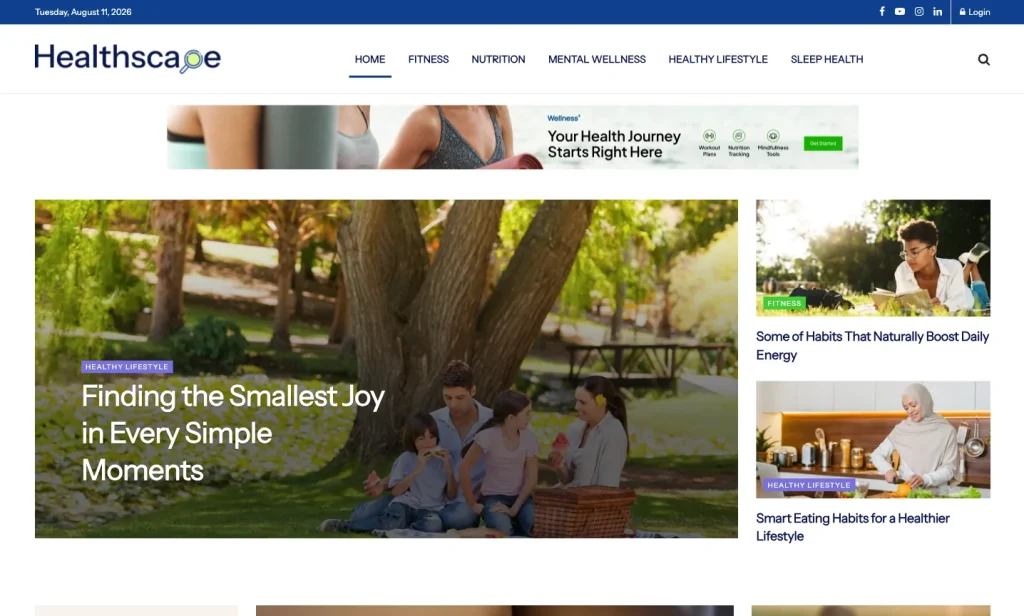
Healthscape is a health-focused demo from JNews theme.
The homepage organizes articles around topics such as fitness, nutrition, mental wellness, healthy living, and sleep health.
This structure works well if you cover several health topics at the same time. At the same time, it keeps each topic easy to find.
You can use Healthscape for content such as:
- Fitness routines and movement tips
- Nutrition and healthy eating articles
- Mental wellness and stress management
- Sleep health and better rest
- Healthy lifestyle habits
- Wellness technology and trends
- Everyday health education
- Subscriber-focused wellness content
A broad health website can become messy when every topic shares the same space.
For example, fitness, nutrition, mental wellness, and sleep all need their own sections. Otherwise, readers may struggle to find articles that match their interests.
Healthscape solves this by giving each major topic a clear place on the homepage.
As a result, the website feels more like an organized health news site than a general personal blog.
What Is Included in the Healthscape Demo
Healthscape gives you a ready-made homepage for a health news website.
You can replace the demo posts with your own content while keeping the basic structure. Therefore, you can spend more time on your articles instead of building every section from zero.
Header With Health Topic Navigation
The header keeps the main health categories easy to find.
The demo includes:
- Home
- Fitness
- Nutrition
- Mental Wellness
- Healthy Lifestyle
- Sleep Health
This simple menu helps new visitors understand the website quickly.
For example, someone looking for sleep tips can go directly to Sleep Health. They don’t need to browse fitness or nutrition articles first.
Likewise, readers interested in stress or mindfulness can open Mental Wellness right away.
Featured Story and Popular News
Healthscape starts with a large featured story area and several supporting articles.
You can use the main area for an important story, seasonal health guide, wellness trend, or article you want more visitors to notice.
This helps you control what readers see first.
The demo also includes a Popular News section.
This works well for health websites because many health articles stay useful for a long time.
For example, an article about better sleep, healthy eating, energy, or fitness motivation may still help readers months after you publish it.
So, you can keep useful older content visible instead of only showing your latest posts.
Newsletter Signup
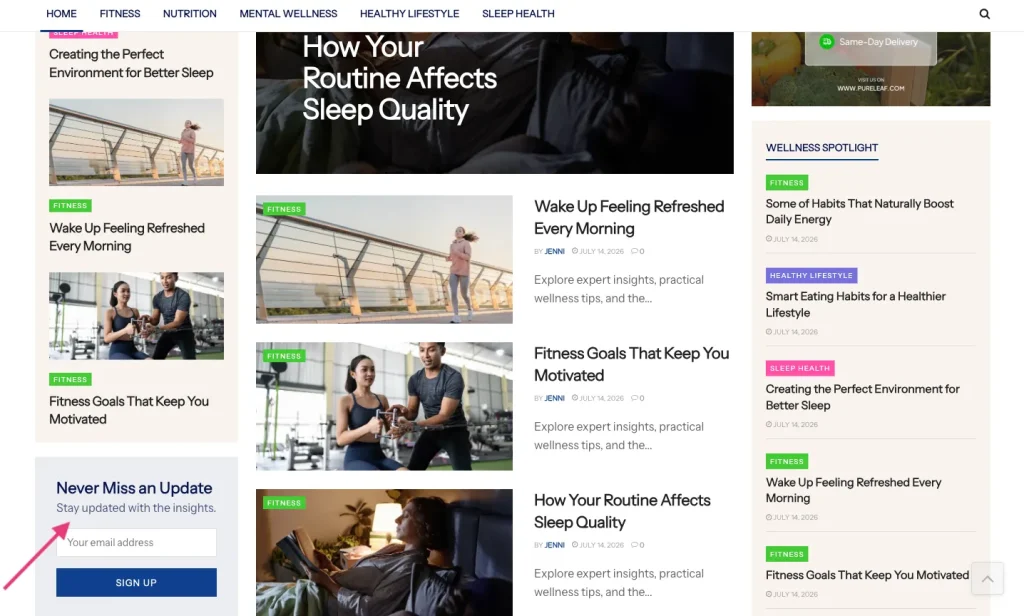
Healthscape includes a newsletter section with the heading Never Miss an Update.
A newsletter can help you bring readers back after their first visit.
For example, you can use it for:
- A weekly wellness newsletter
- Daily health tips
- Sleep improvement emails
- Nutrition and meal planning updates
- Fitness motivation
- Mental wellness reminders
However, don’t only ask readers to “join our newsletter.”
Instead, tell them what they will receive.
For example, you could offer one weekly email with simple health tips and your latest wellness articles.
A clear offer gives people a stronger reason to subscribe.
Wellness Spotlight
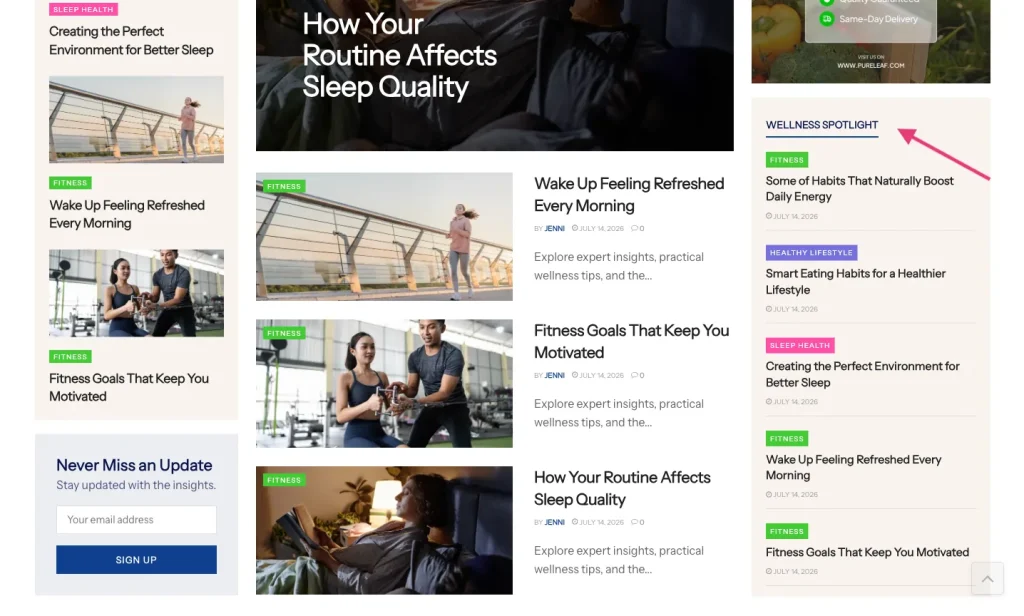
Healthscape includes a Wellness Spotlight section for selected health articles.
You can use this section for useful content that deserves extra attention.
For example, you could highlight:
- A beginner fitness guide
- A practical nutrition article
- A sleep hygiene guide
- A mental wellness story
- A seasonal health topic
This gives readers another way to find useful content.
Instead of browsing every article in order, they can start with the stories you choose to highlight.
What’s New and Only From Healthscape
Healthscape also includes What’s New and Only From Healthscape sections.
Each section has a different purpose.
- What’s New shows your latest articles.
- Only From Healthscape can show selected or special content.
For example, you can use What’s New for your newest articles about sleep, movement, nutrition, or mental wellness.
Meanwhile, Only From Healthscape can feature deeper guides, interviews, editor picks, or original stories.
This helps you separate everyday updates from content that represents your brand.
As a result, readers can better understand which stories are new and which ones deserve extra attention.
In Case You Miss It
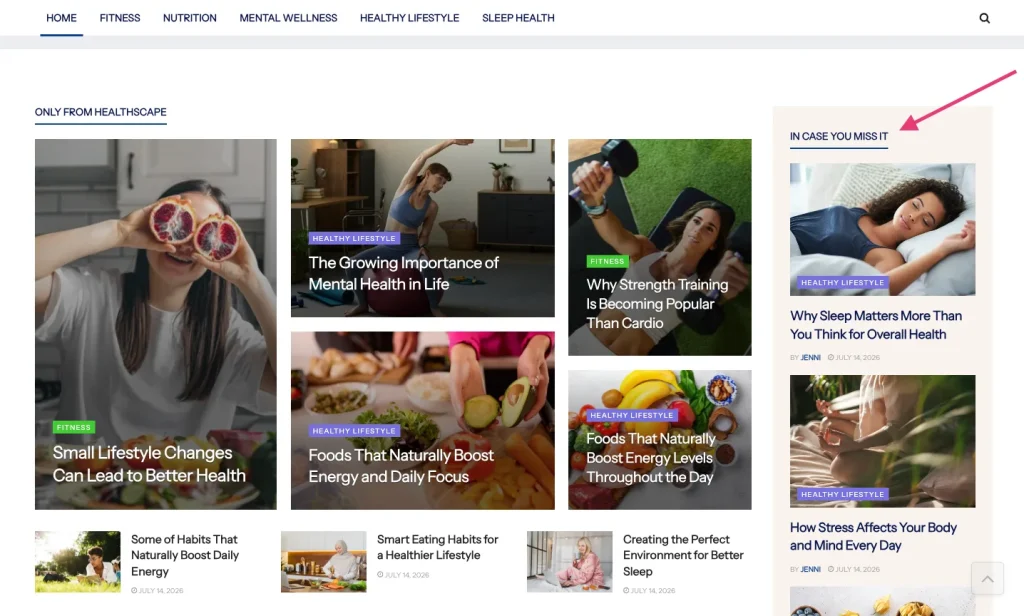
Healthscape also includes an In Case You Miss It section.
You can use it to bring older articles back to the homepage.
This is useful because many health topics remain helpful for months.
For example, an article about sleep habits, stress, energy, or healthy eating may still be useful long after you publish it.
Also, this section helps regular readers catch up on posts they may have missed.
Topic Sections for Wellness, Healthy Lifestyle, and Mental Wellness
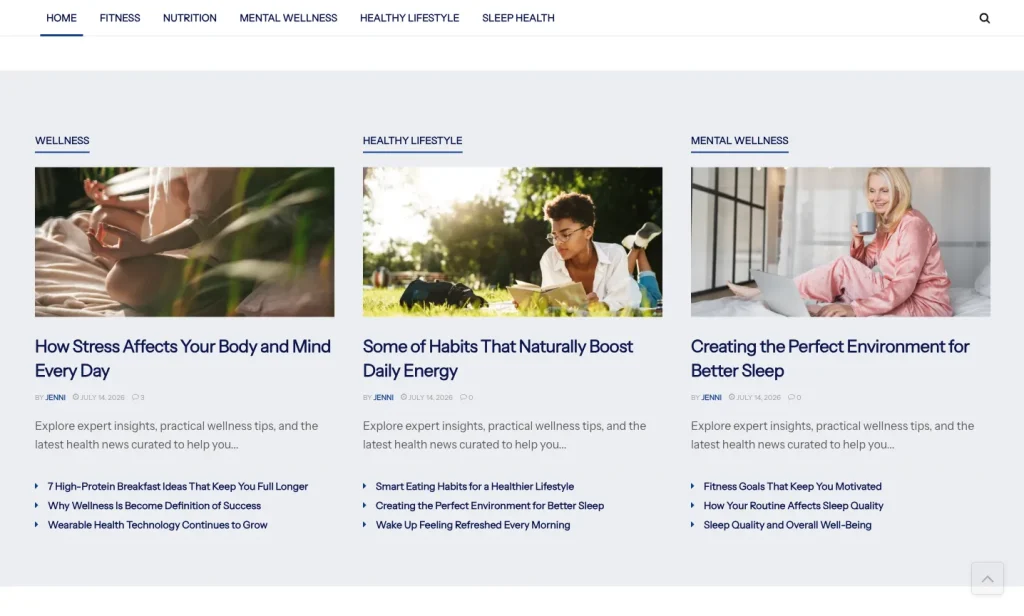
Further down the homepage, Healthscape separates articles into topic sections.
For example, it includes Wellness, Healthy Lifestyle, and Mental Wellness.
These sections help you show different types of content without mixing everything together.
For example:
- Wellness can cover energy, balance, and daily health habits.
- Healthy Lifestyle can cover routines, food, movement, and daily choices.
- Mental Wellness can cover stress, mindfulness, and emotional wellbeing.
However, you don’t have to keep the same section names.
You can change them to match your own website.
For example, a more medical health site may use Prevention, Conditions, Nutrition, Fitness, and Mental Health.
Meanwhile, a wellness brand may prefer Mind, Body, Food, Sleep, and Healthy Living.
This flexibility lets you organize the homepage around the topics you actually publish.
More News and Footer Structure
Near the bottom of the homepage, Healthscape includes a More News section.
This gives readers one more place to discover articles before reaching the footer.
The footer also includes links for popular topics, useful resources, legal pages, and newsletter signup.
For example, Healthscape shows topics such as Weight Loss, Heart Health, Healthy Aging, Diabetes, Mental Health, Immunity, and Sleep.
A useful footer should do more than end the page.
Instead, it should help readers find important pages, explore more topics, and learn about your website.
Who Can Use Healthscape?
Healthscape is a suitable demo for publishers that want more than a simple personal health blog.
You can use it for:
- Health news websites
- Wellness magazines
- Fitness blogs with several content sections
- Nutrition and healthy eating websites
- Mental wellness publications
- Sleep health blogs
- Healthy lifestyle magazines
- Health-focused newsletters with a blog
- Agencies building health websites for clients
Healthscape becomes especially useful if you publish several related topics.
For example, your website may cover fitness, food, sleep, mental wellness, and general health.
How to Install the Healthscape Demo
After you install JNews, you can import the Healthscape demo directly from the JNews dashboard.
Before you start, make sure your website meets the JNews server requirements. You should also activate the required plugins and create a backup, especially if you are importing the demo into an existing website.
If you haven’t purchased the theme yet, you can get it from the official JNews site or the ThemeForest Page.
Follow these steps to import Techra:
- Install and activate the JNews theme.
- Install and activate the required JNews plugins.
- Go to JNews Dashboard > Import Demo & Style.
- Find the Healthscape demo.
- Choose the import option that fits your website.
- Start the import and keep the browser tab open until the process finishes.
- Replace the demo content with your own articles, categories, logo, images, ads, newsletter text, and links.
Before importing, you can also check the official JNews documentation for more details.
How to Improve Your Health News Website After Importing Healthscape
Healthscape gives you the basic layout. However, you still need to make the website fit your own brand and content.
Here are a few important things to update after the import.
Make the Categories Match Your Content
Don’t keep every demo category just because it already exists.
Instead, use categories that match what you actually plan to publish.
For example, a general wellness website may use Fitness, Nutrition, Mental Wellness, Healthy Lifestyle, and Sleep Health.
A more medical health website may add Conditions, Prevention, Healthy Aging, Heart Health, or Diabetes.
Meanwhile, a lifestyle-focused site may use Mind, Body, Food, Sleep, and Daily Habits.
Clear categories make it easier for readers to understand what your website covers.
Add a Clear Editorial Policy
Health readers should understand how you create and review your content.
Therefore, add an editorial policy that explains your process.
For example, tell readers who writes the articles, how you check sources, and how you update old content.
If medical experts review your content, explain that clearly.
However, if your site mainly shares general wellness and lifestyle information, make that clear too.
This helps readers understand what type of information they are reading.
Use One Main Story With Purpose
Choose one important article to feature near the top of your homepage.
For example, you could highlight a timely health topic, a sleep guide, a nutrition article, a mental wellness feature, or a seasonal fitness story.
Don’t choose the featured story only because it is your newest post.
Instead, choose an article that shows readers what your website focuses on.
Make the Newsletter Offer Clear
Healthscape already gives you a newsletter section.
However, you should replace the demo message with a clear offer.
For example, you could provide a weekly wellness digest, meal planning ideas, sleep tips, beginner fitness advice, or mental wellness reminders.
Tell readers exactly what they will receive.
As a result, they have a clearer reason to sign up.
Keep Article Images Clear and Consistent
Images can affect how trustworthy your website feels.
Therefore, choose visuals that match each topic and use a similar style across your homepage.
For example, avoid using random stock images that don’t match the article.
Also, avoid visuals that promise unrealistic health results.
Instead, use clear and relevant images that support the content.
Check the Website on Mobile
After you finish customizing Healthscape, open the site on a phone.
Then, test the main parts of the website yourself.
Make sure you can:
- Browse categories
- Read headlines
- Open the menu
- Read articles
- Subscribe to the newsletter
- Find related content
Readers should not need to zoom in or struggle with the layout.
If something feels difficult to use on your phone, improve it before launching the website.
Ready to Build Your Health News Website?
A good health news website should make it easy for readers to find useful content and move between different topics. Clear categories, featured articles, recent and popular stories, newsletter signup, trust pages, and a responsive layout all help create a better reading experience.
Healthscape gives you a complete starting layout for a health-focused publication. The demo organizes content around topics such as fitness, nutrition, mental wellness, healthy lifestyle, and sleep health. It also provides sections for highlighted stories, popular content, wellness picks, recent posts, older articles, and newsletter signup.
With Healthscape, you don’t have to plan every part of your health news homepage from the beginning. You can import the demo, add your own articles, update the categories, and adjust each section to fit the topics and style of your publication.