


A technology news website needs to keep up with a fast-moving industry. Readers may check AI updates in the morning, gadget reviews at lunch, startup news in the afternoon, and cybersecurity alerts before the day ends.
A general blog theme may not provide everything a technology publication needs. You need clear categories, areas for breaking news, featured stories, popular articles, advertisements, and newsletter signups. The layout should also organize many topics without making the website feel crowded.
If you are looking for a tech news WordPress theme, Techra gives you a more suitable starting point. This is a technology news demo for JNews, designed for websites that cover AI, gadgets, software, startups, cybersecurity, apps, and other technology topics.
In this article, we will explore the essential features every modern news website should have and see how JNews supports each one.
Why a Tech News Website Needs a Specialized Layout
A technology website does more than publish articles. It gives readers a place to check the latest updates every day.
Visitors want to see what is new, what matters, and which stories deserve their attention. A simple chronological blog layout can push important articles down the page too quickly. A crowded layout can also make it difficult for readers to know where to begin.
A good technology news layout should help readers quickly answer questions such as:
- What is the biggest technology story right now?
- Which AI, gadget, software, or cybersecurity stories are trending?
- Where can I find reviews, analysis, and startup news?
- Which articles are new or popular?
- Features that encourage reader interaction
- How can I subscribe for updates?
- Is the website active, trustworthy, and easy to browse on mobile?
Techra organizes the homepage into clear sections for different types of technology content. Instead of building everything from a blank page, you can start with a structure designed for a technology news website.
What to Look for in a Tech News WordPress Theme
Don’t choose a technology news theme only because it looks good. The theme should also help you organize different topics, highlight important stories, and make articles easy for readers to find.
Clear Topic Categories
Technology readers often follow specific topics. Some want the latest AI news, while others prefer gadget reviews, software updates, startup stories, apps, or cybersecurity coverage.
A good theme should make these categories easy to find in the main navigation and across the homepage.
A Section for Your Main Story
Some news stories are more important than others. For example, a major product launch or security breach may need more attention than a small software update.
Your theme should let you place the most important story in a large section at the top of the homepage. This helps readers notice it first.
Breaking News and Trending Sections
Technology changes quickly, so readers expect fresh content. Breaking news sections, top headlines, latest news lists, and popular post areas help visitors find current stories without searching through your entire archive.
Flexible Advertising Placement
Many technology publications earn money through advertisements, sponsorships, affiliate links, and product promotions. Your theme should provide dedicated advertising areas without interrupting the reading experience.
Newsletter Support
A technology news website shouldn’t depend only on search engines and social media for traffic. A newsletter helps you reach loyal readers directly and encourages them to return for daily or weekly updates.
Easy to Read on Mobile
Many people read technology news on their phones. Your theme should automatically adjust the layout for smaller screens. Readers should be able to read the text, open the menu, tap buttons, and browse articles without zooming in.
JNews includes the tools needed to run a technology news website. You can organize articles into clear sections, highlight important stories, display ads, improve SEO, and customize the layout without building everything from scratch.
Techra: A JNews Demo for Technology News Websites
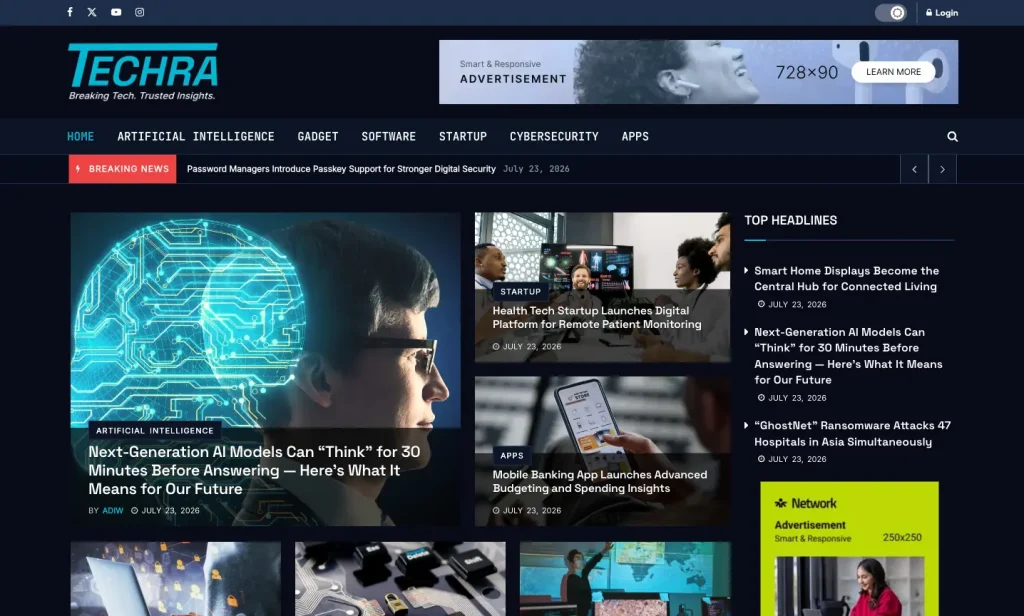
Techra is a JNews demo designed for technology news websites.
The demo helps publishers share breaking news, detailed analysis, expert opinions, and stories about new technology. It works well for websites that cover several technology topics on one homepage.
You can use Techra to publish content about:
- Artificial intelligence
- Gadgets and product releases
- Software and apps
- Startups and funding
- Cybersecurity
- Smart homes, fintech, health technology, and digital services
- Technology trends and analysis
A technology website can quickly become difficult to organize because each topic changes at a different pace. Techra separates content into clear sections, so readers can quickly find important stories and browse the topics that interest them.
What Is Included in the Techra Demo
Techra gives you a ready-made homepage for a technology news website. You can replace the demo content with your own articles while keeping the existing layout and sections.
Header With Navigation, Search, and Ad Space
The header includes the logo, social media links, login access, a search feature, and a navigation menu.
The demo menu includes:
- Home
- Artificial Intelligence
- Gadget
- Software
- Startup
- Cybersecurity
- Apps
Techra also provides a large advertising area in the header. You can use it for display ads, sponsored banners, or promotional campaigns.
Breaking News Slider
The homepage starts with a Breaking News slider that displays several recent stories.
In the demo, this section features topics such as AI model updates, health technology, mobile banking apps, passwordless login, and password manager security.
You can use this section to keep urgent or time-sensitive stories visible near the top of the homepage.
Featured Story and Editorial Grid
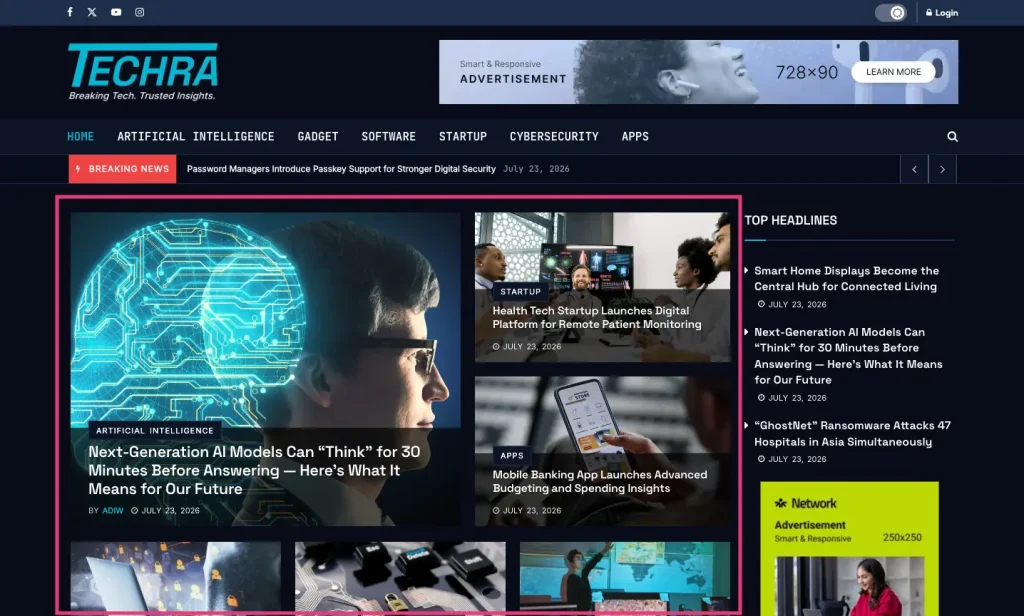
Below the Breaking News slider, Techra displays one main story in a large area. It then shows other featured articles beside or below it.
The demo highlights an artificial intelligence article as the main story. It also features articles about startups, apps, cybersecurity, software, and other AI topics.
This layout helps readers understand which story matters most while still giving attention to other important updates.
Top Headlines and Popular Posts
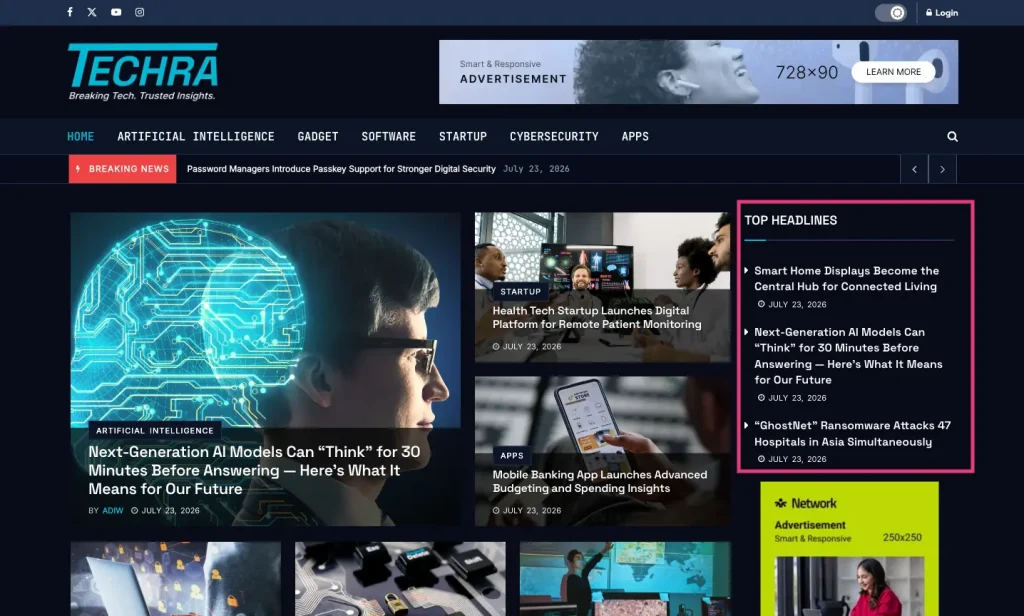
Techra includes separate sections for Top Headlines and Popular Posts. These sections help readers discover important articles beyond the latest posts.
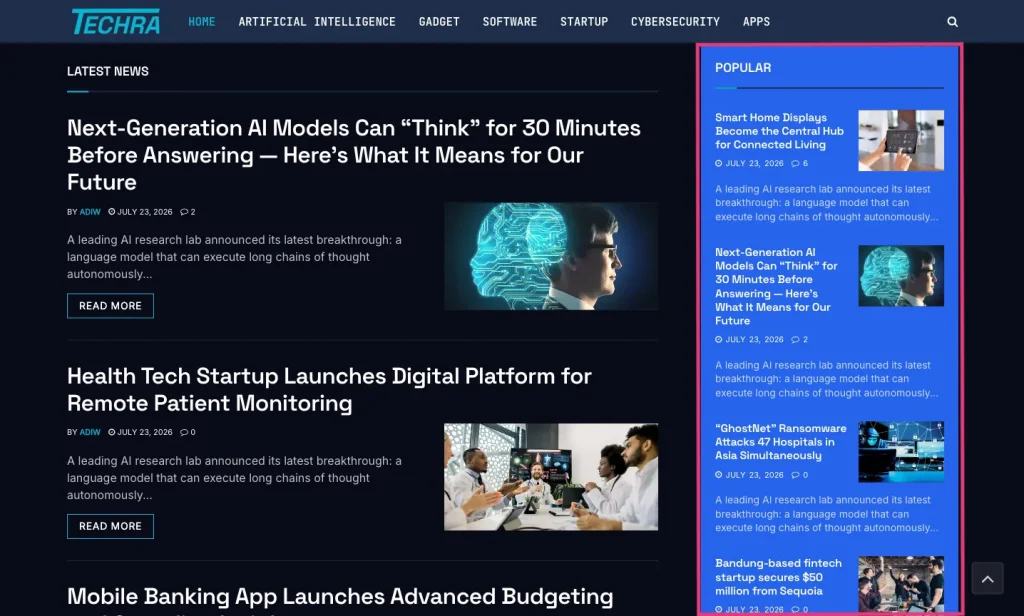
Some technology articles remain useful for weeks or months. For example, readers may continue visiting a cybersecurity guide, startup analysis, or smart home product review after it disappears from the latest news list.
Separate Sections for Each Technology Topic
Techra gives major technology categories their own sections on the homepage.
For example, the Gadget section can display articles about phones, earbuds, laptops, smart home products, and foldable devices.
The Software section can feature password managers, productivity tools, low-code platforms, cloud software, and desktop applications.
The Startup and Cybersecurity sections use a similar layout for their own articles.
These sections make the homepage easier to browse. Readers can quickly find the topics that interest them without searching through one long list of mixed articles.
Newsletter Signup
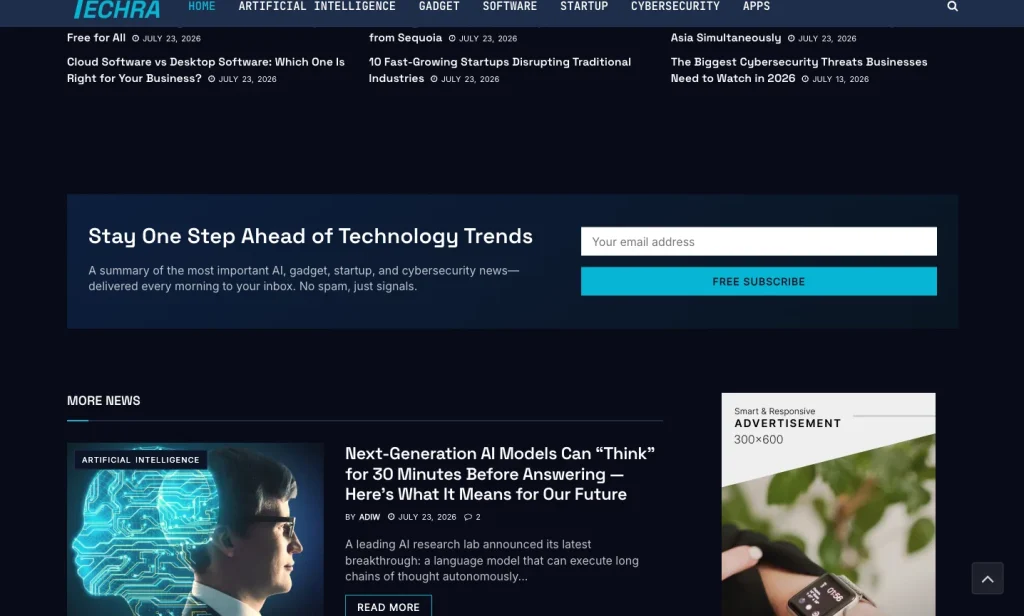
This demo includes a newsletter section with the message, “Stay One Step Ahead of Technology Trends.”
You can use this section to collect email subscribers and bring readers back to your website.
For example, you can offer:
- A daily technology news summary
- A weekly roundup
- Product review updates
- Cybersecurity alerts
- Startup and funding news
More News and Footer Structure
Near the bottom of the homepage, Techra includes a More News section that displays additional articles.
The footer provides links to technology categories, important pages, company information, social media profiles, and the newsletter signup form.
These links give readers more ways to explore your website after they reach the bottom of the page.
Who Can Use Techra?
Techra works well for publishers who want to build a complete technology news website instead of a simple blog.
You can use this demo for:
- Technology news websites
- AI news blogs
- Gadget review websites
- Cybersecurity publications
- Software and app blogs
- Startup and innovation magazines
- Technology newsletters with a blog
- Client websites built by agencies
This demo is most useful when your website covers several technology topics. For example, you may publish articles about AI, gadgets, software, startups, and cybersecurity.
How to Install the Techra Demo
After you install JNews, you can import the Techra demo directly from the JNews dashboard.
Before you start, make sure your website meets the JNews server requirements. You should also activate the required plugins and create a backup, especially if you are importing the demo into an existing website.
If you haven’t purchased the theme yet, you can get it from the official JNews site or the ThemeForest Page.
Follow these steps to import Techra:
- Install and activate the JNews theme.
- Install and activate the required JNews plugins.
- Go to JNews Dashboard > Import Demo & Style.
- Find the Techra demo.
- Choose the import option that fits your website.
- Start the import and keep the browser tab open until the process finishes.
- Replace the demo content with your own articles, categories, logo, images, ads, newsletter text, and links.
Before importing, you can also check the official JNews documentation for more details.
How to Improve Your Tech News Website After Importing Techra
Techra gives you a ready-made layout, but you still need to customize the content to match your publication.
Update the Categories
Use categories that match the topics you actually cover.
For example, Techra already works well for AI, gadgets, cybersecurity, and startups. If your website also covers gaming, crypto, developer tools, or enterprise technology, update the menu and homepage sections to include them.
Choose One Main Story
Select one important article to feature at the top of the homepage.
This could be a major product launch, an important AI update, a security issue, or another story that your readers should notice first.
Replace the Demo Ads
Techra includes several advertising areas. Replace the demo ads with campaigns that fit your audience.
You can use these spaces for:
- Sponsored banners
- Affiliate promotions
- Newsletter campaigns
- Events
- Product offers
Make Your Newsletter Clear
Tell readers exactly what they will receive when they subscribe.
For example, you can offer a daily tech news summary, a weekly AI roundup, gadget deal alerts, cybersecurity updates, or startup funding news.
A clear description gives readers a better reason to subscribe.
Keep Your Article Images Consistent
Use images with consistent sizes and styles across your website.
Choose visuals that match the article topic instead of using random stock photos. For product reviews, startup news, and cybersecurity articles, relevant images can also help readers understand the story faster.
Check the Website on Mobile
After you customize Techra, open the website on a phone and check each section.
Make sure readers can easily view the main story, open the menu, browse categories, read articles, see ads, and use the newsletter form without zooming or struggling with the layout.
Ready to Build Your Technology News Website?
A technology news website needs more than a clean design. You need clear categories, space for important stories, ad placements, newsletter signup, and a layout that works well on both desktop and mobile.
Techra gives you a ready-made technology news layout inside JNews. It includes sections for AI, gadgets, software, startups, cybersecurity, and apps. It also includes breaking news, featured stories, top headlines, popular posts, ads, and newsletter signup areas.
If you want to build a technology news website in WordPress without creating the layout from scratch, Techra gives you a practical starting point. Import the demo, replace the sample content with your own articles, and customize the categories and sections to match your publication.